
Mastering Closet Organizer Software: 3 Essential Tips
You're about to reveal the full potential of your closet organizer software! To get started, create a digital replica of your actual closet space, including dimensions and layout. Next, maximize storage space by optimizing shelf arrangements and utilizing hidden compartments. Finally, customize your organizer system to fit your unique needs and style by choosing layouts, colors, and fonts that reflect you. By following these essential tips, you'll be well on your way to creating a personalized haven where every item has its designated space. Now, take the next step to discover even more innovative ways to transform your closet.
Key Takeaways
• Create a digital replica of your closet, including dimensions and layout, to visualize and optimize storage space virtually.
• Assign categories and color-code items for easy access and identification in your virtual closet organizer system.
• Utilize hidden compartments and strategically place items to maximize storage space and reduce clutter in your virtual closet.
• Customize your organizer system with personalized layouts, colors, and fonts to reflect your unique style and preferences.
• Set up a 'frequently worn' section and 'seasonal storage' zone to streamline your virtual closet and reduce decision fatigue.
Setting Up Your Virtual Closet
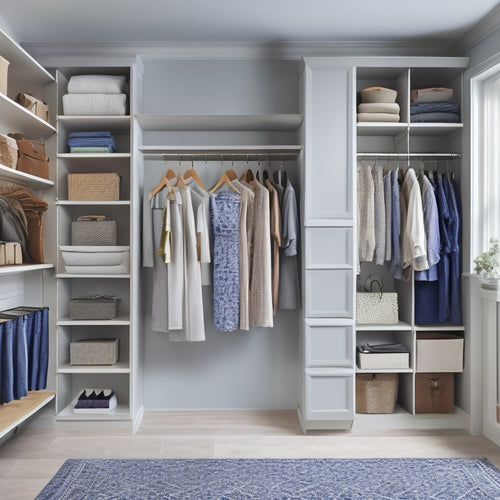
You start building your virtual closet by creating a digital representation of your actual closet space, including its dimensions and layout. This is where the magic begins! Think of it as a digital blueprint of your closet, minus the clutter and chaos.
Once you've got your virtual space set up, it's time to start adding your clothes, shoes, and accessories. This is where the fun part begins – virtual outfit planning! Imagine being able to try on outfits without having to physically get dressed, or seeing how that new top would look with those jeans without having to dig them out of your closet. It's like having your own personal stylist at your fingertips.
But it's not just about the clothes – organizing accessories is a breeze with virtual closet software. You can categorize and store your scarves, hats, and bags in a way that makes sense to you, making it easy to find the perfect accessory to complete your outfit.
And the best part? You can do it all from the comfort of your own home, without having to lift a finger (except to click your mouse, of course!). So go ahead, get started, and watch your virtual closet come to life!
Maximizing Storage Space Virtually
Maximizing Storage Space Virtually
Three key areas to focus on when maximizing storage space virtually are optimizing shelf arrangements, utilizing hidden compartments, and strategically assigning categories to your items.
You're not just playing virtual interior designer; you're a space optimization mastermind! By optimizing your shelf arrangements, you're ensuring that every inch of your virtual closet is used efficiently. Think of it like a real-life game of Tetris – you want to fit as many pieces together as possible without any gaps.
Next, utilize those hidden compartments to stash away items you don't need immediate access to. It's like having a secret hiding spot, but instead of hiding your snack stash, you're hiding your out-of-season clothes.
Customizing Your Organizer System
With your virtual closet's storage space maximized, it's time to tailor your organizer system to fit your unique needs and preferences. Think of it as decorating your dream closet – you get to decide how everything looks and functions!
This is where personalized customization comes in. You can choose from various layouts, colors, and fonts to create a space that reflects your style.
Here are 4 ways to take your customization to the next level:
-
Color code your categories: Use different colors to categorize your clothes, shoes, or accessories. This visual system will make it easy to find what you need in a snap.
-
Create a 'frequently worn' section: Designate a special area for your go-to items, so they're always easy to access.
-
Add custom labels and tags: Label your shelves, drawers, or rods with descriptive tags, like 'work attire' or 'formal wear.'
- Set up a 'seasonal storage' zone: Designate a section for out-of-season clothes, so they're out of the way but still accessible when the time comes.
Frequently Asked Questions
Can I Use Closet Organizer Software for Other Types of Storage Spaces?
You're wondering if closet organizer software can help with other storage spaces? Absolutely! You can repurpose it for garage organization, kitchen storage, or even your home office - think maximizing that tiny desk drawer!
Are There Any Free Closet Organizer Software Options Available?
Did you know 75% of people can't find what they need in their cluttered spaces? You're in luck! Yes, there are free closet organizer software options available, but be aware of limitations. Compare features and usability to find the best fit for your organizational needs.
Can I Share My Virtual Closet With a Professional Organizer?
You're wondering if you can share your virtual closet with a pro, right? Yep, most software lets you do that! You'll be collaborating remotely in no time, having a virtual consultation that's as smooth as a Marie Kondo fold.
Will the Software Provide Product Recommendations for My Closet?
You'll love that the software provides personalized product suggestions based on your style and preferences! It's like having a virtual stylist, offering customization options and outfit planning ideas to elevate your closet game.
Is My Closet Data Stored Securely in the Software?
You're wondering if your closet data is safe from prying eyes? Rest assured, reputable software prioritizes data security, addressing privacy concerns with robust encryption and secure servers, so your fashion faves remain confidential!
Related Posts
-

Maximize Space With These Top Organization Apps
You're just a few clicks away from maximizing your space and time! Start by decluttering your digital life, then opti...
-
What Makes an Efficient Walk-In Closet System?
You create an efficient walk-in closet system by combining customizable shelves and storage that cater to your unique...
